Here it is the sound of the EMD 1290.
40 cylinders, 7200 horsepower, 4 turbos...
Cold Startup 40 cylinder diesel
Thursday, December 17, 2015


First Bondo Day on the MP40-1290
First Bondo Day
First I had to finish the milling and rough sand most of the shell....
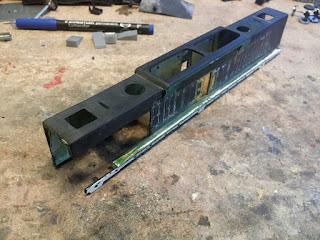


First I had to finish the milling and rough sand most of the shell....

Next I assembled the blower housing

Using the chopper, I made some styrene panels and attached them with Plio Bond in case I made any mistakes. Using Testors or CA is somewhat risky when fitting panels because the fit has to be perfect, with contact cement there is always the ability to make one more cut if you have to.

Now to mix up some bondo... that's about 2 tablespoons and half a cap full of hardener. This will give 5 minutes of working time.

With 5 minutes, I can fill the sections and immediately trim the bondo while it's the consistency of rubber. I can even clean my glass plate I use to mix it on.

5 minutes later.....not a huge amount of sanding to do and a nicely fill shell...

Wednesday, December 9, 2015
Maelstrom Death Touch 4000 Super Turbo 60" Fans
Maelstrom Death Touch 4000 Super Turbo 60" Fans
And the MP40-1290 project continues... here's a couple pics of the new fan set:


This is the proposed layout of a 40 cylinder 645 ceramic and teflon coated power plant:

The retro future builders plate:

And here it is in the box:

Saturday, December 5, 2015
update on modelbuildings.org Shipping Containers aka CONEX
Here's an update on the package of shipping containers, also known as CONEX's from:
modelbuildings.org
Since my first review I've learned some better techniques...
Somewhere I had stumbled across their video on youtube (which is on the page in the above link) and thought this would be kind of a fun project for me and my 6 year old daughter to do. The video shows a pretty cool method of making CONEX's of various sizes and you can make as many as you want forever once you have the package. It comes as a set of PDF's.
So let's start with the pictures and then I'll tell you what I learned after making 15 of them...
The green Evergreen containers are regular commercial products that cost about $10 each

Here are some 10' containers, I don't recall ever seeing any 10 footers you can just buy, but 10' containers are very common in the military:
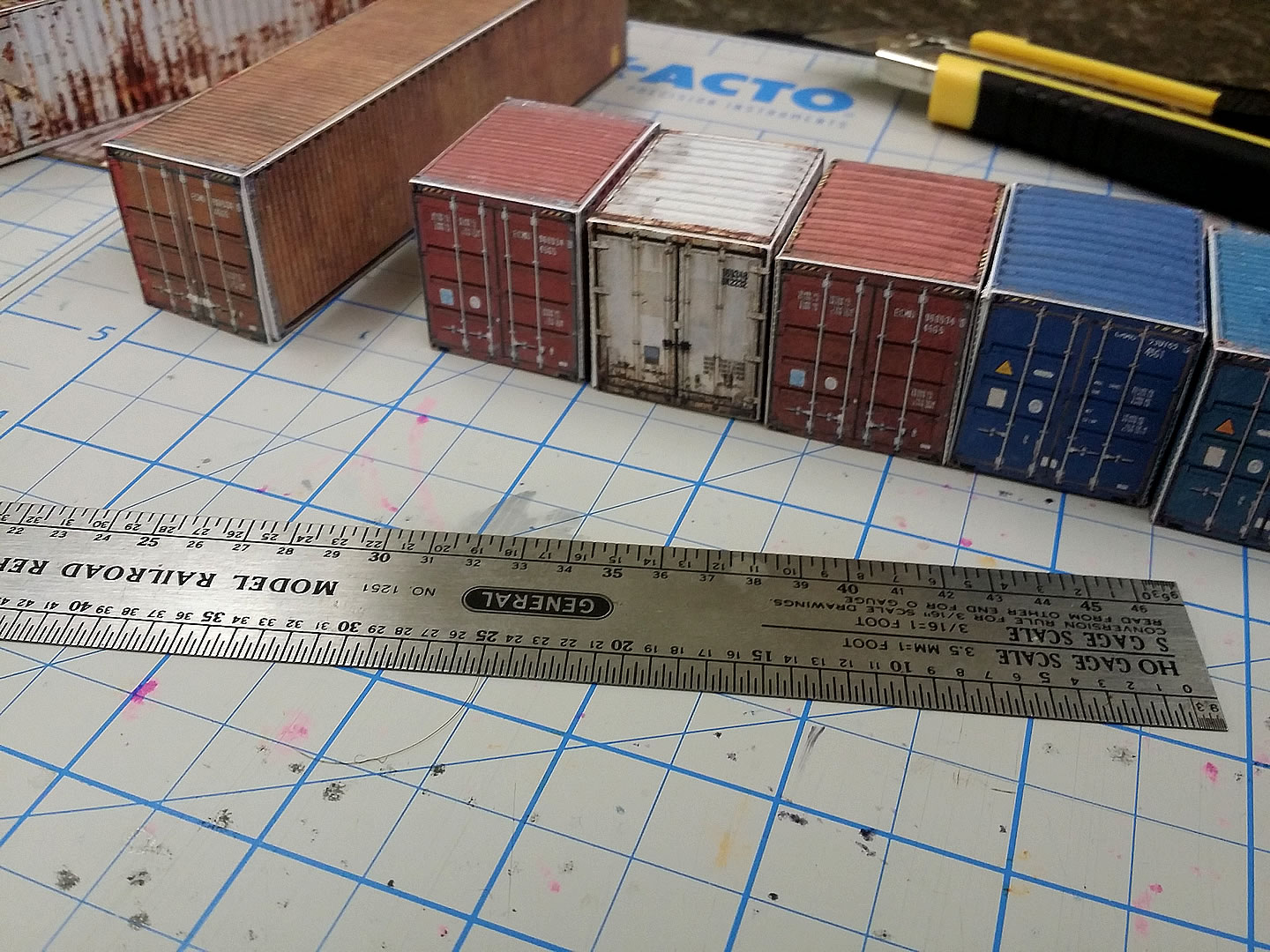
Here are some containers ready for the assembly process...
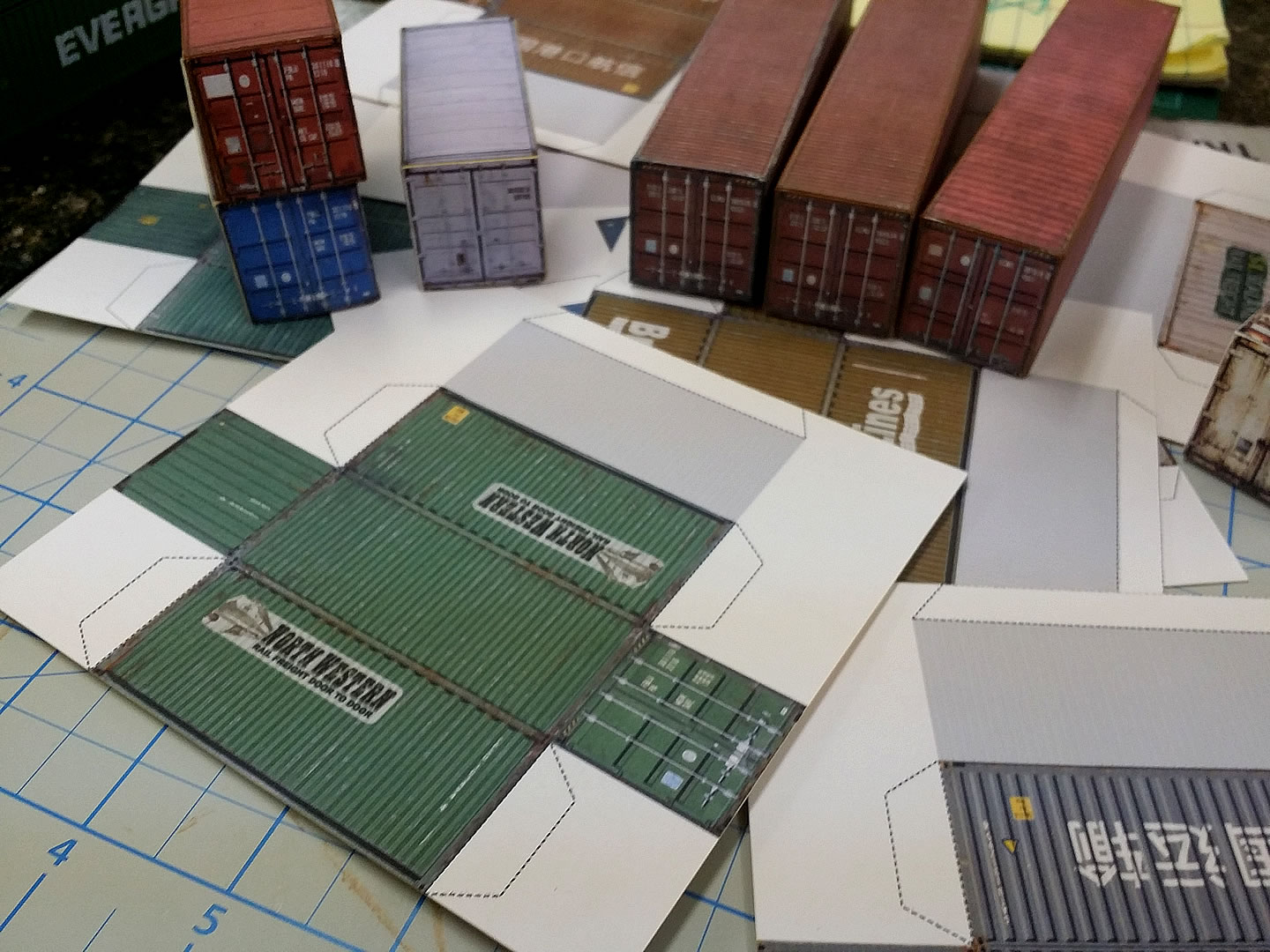
The whole package was $27. I love this product. My first thought was that I could make my own using this method and some photographs, but for 27 bucks there is no reason to go through all that trouble. There are 40 different containers that come in several sizes. There are 40', 20' and 10' containers in the package. The website breaks down exactly how many of each kind.
Watching the video shows exactly how to make them. It's super simple - print the container you want, glue it to cereal box card board, trim it, then score the folds and glue it. Done.
So I used their method for the first one. It worked fine, but I've got a lot more experience in printing and mounting and have several tips that makes for a better finished product and takes less time.
1. I use Epson S041062 paper. It's a superior paper and 100 sheets can be had for $15 or less. I use Epson Stylus 2200 and 3800 printers, so I had tons of this paper on hand, but on my very first print I used my Epson WF 3640, which is comparable to what most of you will be using. The print was pretty good. The paper makes a ton of difference, I also used plain jane copy paper and that one was usable.
2. I used the cheapest card stock that I got at a surplus office supply place for about $5. THE COLOR OF CARDSTOCK DOESN'T MATTER. I wasn't about to go cereal box hunting.
3. I've got tons of experience in mounting methods and this method is by far the fastest and cheapest: They show gluing by hand, but way faster and much better quality is to buy Elmers Spray Glue. It's cheap. 3M photomount is awesome stuff, but just too much money for this project. YOU DON'T NEED TO BE ACCURATE WHEN MOUNTING, JUST GET THE PICTURE ON THE CARDSTOCK, DOESN'T MATTER IF IT'S CROOKED.
4. To get a really good mount, you should have a roller that's used in gluing countertop materials to counters. They usually have a longer handle and have a little weight to them. A speed roller will work, but it's harder work. A kitchen roller also works, but still harder work.
5. Once mounted with Elmer's Spray Glue, you can start cutting right away. I printed all 8 20' containers and mounted them all at the same time, took like 10 minutes from starting the print job to being done with the mounting for all 8.
6. I learned the hard way that you **MUST** use a steel ruler and a heavy carpet knife. On my first try I used an engineer's scale (triangle shaped) and an XACTO knife. It was tough to cut all the way through the card stock where needed and I ruined my scale by shaving off the edges continuously. So I got out the carpet knife that had some good weight to it and a wood school ruler with a metal edge....the heavy knife shaved the metal off the ruler. Finally I used my model railroad ruler and that worked very well, but to protect it from getting the edges shaved I got a heavy steel ruler for $2 at a discount tool store. That solved all the problems.
7. The video shows them using CA to assemble the container. That was a bad idea. First, I got it all over my fingers. Then any place where you glue, but are off by even a little bit, becomes a permanent defect. My first few containers are just a bit crooked. I switched to Elmer's white glue and used a large steel bolt to hold the container down while the glue cured. The white glue made all the difference in that the finished box can be squared up after the glue has been applied and a little weight on top holds it right where you want it.
8. When complete you will see the color of the cardstock in all the edges of the container. I found using oil chalk that sort of matches the color of the box works really good to give it the finishing touch.
Now, the real reason I like this product is that these containers look pretty good and cost maybe 20 cents in materials. The ink may cost more on a printer with fewer cartridges. They take less than 10 minutes to assemble after being mounted. I trimmed several at a time.
They aren't really that good for putting on a train, but if you want a huge yard full of containers, then this is perfect for that. With single containers costing around $10, it's just not really feasible to have a yard with 500 containers sitting in piles. Also not a wise use of money for a totally static display.
If you use Google Earth do this: turn on 3D buildings; under more-transportation turn on railroads; turn off streets in the primary list. Next goto the Port of Long Beach in LA and zoom in on the container shipping area. You'll see the storage blocks. The closest ones to the ships are 100 columns by 15 rows by 5 stacked. That's 7500 containers for just 1 of the approximately 40 blocks. If the place was full that would be around 300,000 containers. That's just 1 of the many loading areas on Terminal Island.
With these paper containers you could make a very large terminal for very little money, and it can grow over time.
If you played your cards just right you might get the wife to crank out a few of them with a TV tray and a movie....
I really like this product. I haven't tried any of their other stuff, but I plan to take a closer look.
modelbuildings.org
Since my first review I've learned some better techniques...
Somewhere I had stumbled across their video on youtube (which is on the page in the above link) and thought this would be kind of a fun project for me and my 6 year old daughter to do. The video shows a pretty cool method of making CONEX's of various sizes and you can make as many as you want forever once you have the package. It comes as a set of PDF's.
So let's start with the pictures and then I'll tell you what I learned after making 15 of them...
The green Evergreen containers are regular commercial products that cost about $10 each
Here are some 10' containers, I don't recall ever seeing any 10 footers you can just buy, but 10' containers are very common in the military:
Here are some containers ready for the assembly process...
The whole package was $27. I love this product. My first thought was that I could make my own using this method and some photographs, but for 27 bucks there is no reason to go through all that trouble. There are 40 different containers that come in several sizes. There are 40', 20' and 10' containers in the package. The website breaks down exactly how many of each kind.
Watching the video shows exactly how to make them. It's super simple - print the container you want, glue it to cereal box card board, trim it, then score the folds and glue it. Done.
So I used their method for the first one. It worked fine, but I've got a lot more experience in printing and mounting and have several tips that makes for a better finished product and takes less time.
1. I use Epson S041062 paper. It's a superior paper and 100 sheets can be had for $15 or less. I use Epson Stylus 2200 and 3800 printers, so I had tons of this paper on hand, but on my very first print I used my Epson WF 3640, which is comparable to what most of you will be using. The print was pretty good. The paper makes a ton of difference, I also used plain jane copy paper and that one was usable.
2. I used the cheapest card stock that I got at a surplus office supply place for about $5. THE COLOR OF CARDSTOCK DOESN'T MATTER. I wasn't about to go cereal box hunting.
3. I've got tons of experience in mounting methods and this method is by far the fastest and cheapest: They show gluing by hand, but way faster and much better quality is to buy Elmers Spray Glue. It's cheap. 3M photomount is awesome stuff, but just too much money for this project. YOU DON'T NEED TO BE ACCURATE WHEN MOUNTING, JUST GET THE PICTURE ON THE CARDSTOCK, DOESN'T MATTER IF IT'S CROOKED.
4. To get a really good mount, you should have a roller that's used in gluing countertop materials to counters. They usually have a longer handle and have a little weight to them. A speed roller will work, but it's harder work. A kitchen roller also works, but still harder work.
5. Once mounted with Elmer's Spray Glue, you can start cutting right away. I printed all 8 20' containers and mounted them all at the same time, took like 10 minutes from starting the print job to being done with the mounting for all 8.
6. I learned the hard way that you **MUST** use a steel ruler and a heavy carpet knife. On my first try I used an engineer's scale (triangle shaped) and an XACTO knife. It was tough to cut all the way through the card stock where needed and I ruined my scale by shaving off the edges continuously. So I got out the carpet knife that had some good weight to it and a wood school ruler with a metal edge....the heavy knife shaved the metal off the ruler. Finally I used my model railroad ruler and that worked very well, but to protect it from getting the edges shaved I got a heavy steel ruler for $2 at a discount tool store. That solved all the problems.
7. The video shows them using CA to assemble the container. That was a bad idea. First, I got it all over my fingers. Then any place where you glue, but are off by even a little bit, becomes a permanent defect. My first few containers are just a bit crooked. I switched to Elmer's white glue and used a large steel bolt to hold the container down while the glue cured. The white glue made all the difference in that the finished box can be squared up after the glue has been applied and a little weight on top holds it right where you want it.
8. When complete you will see the color of the cardstock in all the edges of the container. I found using oil chalk that sort of matches the color of the box works really good to give it the finishing touch.
Now, the real reason I like this product is that these containers look pretty good and cost maybe 20 cents in materials. The ink may cost more on a printer with fewer cartridges. They take less than 10 minutes to assemble after being mounted. I trimmed several at a time.
They aren't really that good for putting on a train, but if you want a huge yard full of containers, then this is perfect for that. With single containers costing around $10, it's just not really feasible to have a yard with 500 containers sitting in piles. Also not a wise use of money for a totally static display.
If you use Google Earth do this: turn on 3D buildings; under more-transportation turn on railroads; turn off streets in the primary list. Next goto the Port of Long Beach in LA and zoom in on the container shipping area. You'll see the storage blocks. The closest ones to the ships are 100 columns by 15 rows by 5 stacked. That's 7500 containers for just 1 of the approximately 40 blocks. If the place was full that would be around 300,000 containers. That's just 1 of the many loading areas on Terminal Island.
With these paper containers you could make a very large terminal for very little money, and it can grow over time.
If you played your cards just right you might get the wife to crank out a few of them with a TV tray and a movie....
I really like this product. I haven't tried any of their other stuff, but I plan to take a closer look.
Wednesday, October 28, 2015
Containers made of Paper
Paper Containers
How many of you have seen this video:
I watched it. At the same time I was trying to think of something my daughter and I could do together for our Thursday art project.
I've got considerable experience in photo printing and photo mounting and this video caught my interest. It looked good enough that I went ahead and bought the whole package of containers. This is my report....
Here is the link to the place I got them from: http://www.shippingcontainermodels.com/
First, let me show you how some of mine turned out:

Pretty cool actually. What I have to say about these containers is that, while they won't likely be carried on my well cars, they will help me make a massive container facility. They cost next to nothing to make. Once you pay your $27 for a set of pdf's, you can make as many as you want as often as you want.


It's as easy as they show in the video. After making about my 3rd container, I got it down to making several at a time. I'm going to do an experiment in a couple days where I see how many I can make while watching a movie.
Here are some tips I have for an improved method of making these containers:
1. They look fine on plain paper, use regular paper for most of your work. Using high quality presentation paper makes them more vivid and is better for the most prominent containers that you might photograph or scenes where only a couple containers are present.
2. Use regular Elmer's Glue All (plain white glue) instead of super glue, it has working time that super glue doesn't. Also, the first couple I made got a ton of super glue on my fingers.
3. Use card stock instead of cereal boxes. It's easier to get and you don't have to raid all your cereal boxes.
4. Use Elmer's spray adhesive (or for 3x as much money use 3M Photo Mount) to attach the paper to the card stock.
5. Don't worry if the paper and card stock don't line up because you're cutting it up anyways.
6. A heavy roller used for countertops and laminates works the best for smoothing the paper and card stock after you use spray adhesive.
7. Use a rotary cutter if you have it to do the rough trimming, if you don't, then use a decent box cutter and steel ruler for the cuts where you cut material away. I wrecked 3 different types of rulers before getting out the steel ruler. The wood ruler with the metal strip is now the wood ruler that formerly had a metal strip.
8. For the scoring, an xacto #17 blade and a machinists ruler works great.


I'm making some more so I'll continue to update on this project.....
Saturday, July 4, 2015
The Kumu Diagram
I'm working on planning for my next layout, which believe it or not is basically a 4-6 track loop. So what I did was take some of my data and use a social engineering diagram algorithm and this it what I got so far:

I used the Kumu website to do this and Adobe Fireworks to make the image. Check it out, it's kind of interesting.

I used the Kumu website to do this and Adobe Fireworks to make the image. Check it out, it's kind of interesting.
Subscribe to:
Posts (Atom)